
Modern businesses are faced with numerous sources and types of
communication which they can utilize to their advantage. A set of
technology they can use to harness today’s multiple communication
channels is call center
software[1]. What is call center
software? It is a system that allows businesses to manage multiple
communication channels such as phone, email, live chat, instant
messaging, SMS text, and social media.
Call center software comes in many forms and functions including
auto dialer, call center monitors, call accounting solutions, call
analytics, predictive dialer, computer telephony integration (CTI),
interactive voice response (IVR), and automatic call distributor
(ACD). It can be utilized as part of a customer support platform or
help desk system with ticketing functionality to help agents
respond to customer queries and resolve issues.
Advancements in Voice over Internet Protocol (VoIP) and hosted
software has made a reality the hosted call center environment
requiring the most basic components – a PC, a browser and a phone.
With a call center solution, you can now easily set up your own
dedicated call center hub that can undertake quality monitoring,
call recording, speech/text analytics, virtual queuing/web
callback, and social media support. What is call center software?
It is your tool for enhancing your help desk and boosting customer
support which are service areas you should do well to focus on for
the reasons we’ll tackle next.
Despite its seemingly diminishing status and the wide
availability of self-service channels, the phone is still a favored
tool by customers. A research study by Harvard Business Review
found out that 57% of customers end up shifting
from web to phone (inbound call) for support[2]. Meanwhile, according to
eConsultancy, customers prefer the following support
channels[3] when they need help:
phone, email, live chat, online knowledge base, and “click to call”
support automation. On the side of businesses, a Contact Center
Survey revealed that 62% of organizations view customer experience
provided through contact centers as a competitive
differentiator.
Top 5 Support Channels Preferred by
Customers

Credits: econsultancy.com
In this article, we’ll examine the many aspects of call center
software, including the following:
- Types of Call Center
Software[4] - What Does Call Center
Software Do?[5] - How Does Call Center
Software Work?[6] - Advantages of Call Center
Software[7] - Features of Call Center
Software[8] - Cost of Call Center
Software[9] - Examples of Call Center
Software[10]
Types of Call Center Software
The purpose of call center software is to help businesses manage
customer communication coming from multiple channels and sources.
Depending on how communications are processed and how the system is
deployed, call center software can be classified into the
following:
- On-premise call center systems. These are
usually sold with on-time utilization license where the company
user takes care of the upgrade and maintenance of the call center.
These normally require installation of private branch hardware and
equipment and are the most professional type of call centers,
although they are also the most expensive. - Cloud-based call center systems. These
are also SaaS models with the call center hosted in cloud,
accessible from anywhere without need for downloading or installing
the software. These are the most affordable call center
systems.
What Does Call Center Software Do?
To answer the question – what does call center software do? – we
have to comprehend it basic purpose and function. The platform
basically allows a company or organization to run a call center
with the goal of extending support to customers for their
inquiries, and to serve as a help desk for customer issues. It
clears the way for customer communication with your company,
allowing them the means to interact and engage with your company
relating matters involving your business, products, and services.
Now communication through the call center system is two-way –
customer to you, and you to your customer (marketing, promotions,
feedback, deals, offers, etc).
To do all the above and more, call center software is built with
functionalities to facilitate that two-way communication. You can
utilize features for voicemails, emails, support ticket, chat, and
conferencing, among others. To get comprehensive information about
callers, call center systems provide integration capabilities with
CRMs, helpdesks, ecommerce platforms, marketing software, and chat
systems. Integrated call center software can show you the caller’s
previous purchase history, voicemails, notes, cases, phone calls
with the company, chat transcripts, support tickets, and others.
All the functionalities allow agents to deliver better service,
streamline workflows, and get rid of entering redundant information
into multiple systems.
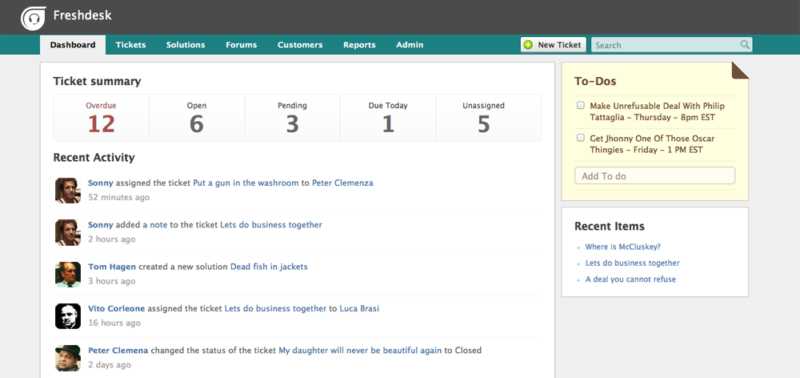
Freshdesk’s ticket dashboard shows your
key metrics at a glance.
How Does Call Center Software Work?
The workings of call center software will determine the level of
quality of the support service and help you’ll provide to your
customers. How does call center software work? Call center software
is first and foremost a management solution used by organizations
to administer the incoming calls and communication related to
product support or informational queries. Likewise, it is also used
to make outbound calls to targeted audience for product marketing
and sales. Call center software typically facilitates the following
steps:
- The system identifies the customer by checking the unique entry
in the database (DB), and if the caller is not in the DB
then the software usually adds the new caller’s entry for future
reference. - If the caller’s entry is in the DB, the records are accessed
and showed to the agent when they get a call, equipping the agent
with enough information about the customer including issue history
before handling the call. - When the caller has provided a reply to the automated response
or by verbal acknowledgment, the call is properly queued according
to the mapping in the DB (usually based on agent skills
set and the queue name). - As the call is pushed to the queue, all agents that are mapped
to that queue can pick up the call manually or take it as an
automatic assignment based on a scheduling system. - Upon taking the call, the agent can assist the customer by
giving instructions over the call or through email, having
supervisors/senior agents in on the call for guidance and faster
resolution, or even by taking remote access to the caller’s
system. - If the issue is not resolved at that time, the system allows
the agent to keep of the interactions with the customer, and can do
regular follow-up to keep track on the status and progress. - Based on the customer’s response, an agent can indicate the
status of the ticket as open, closed, resolved, or requires
follow-up. - When the status of the ticket is marked as “closed”, an
automated survey call or email is sent to the customer for
feedback, the results of which can be utilized by the company for
its marketing strategies or other purposes.
As you can see from the steps above, system streamlines an
otherwise tedious process and makes the job of call center agents
easier and less complicated, ensuring efficiency and productivity
to assigned personel, and providing quality and prompt support to
customers.
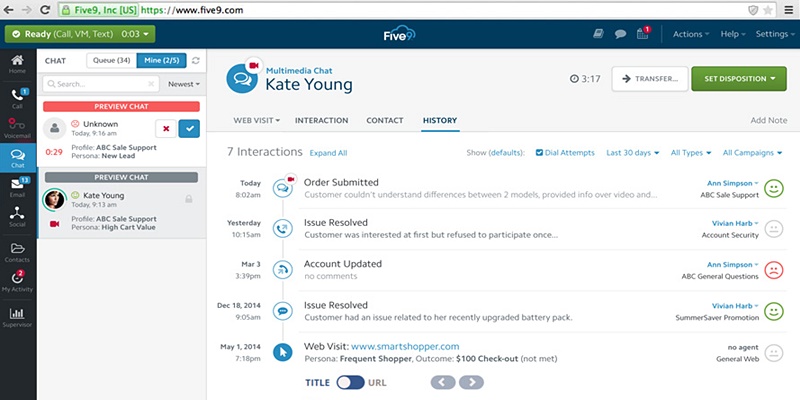
Five9: Mixes inbound and outbound
capabilities to boost agents’ productivity.
Advantages of Call Center Software
Why use call center software? What is call center software but a
system designed for efficiency and productivity, maximizing the use
of communication technology to engage and interact with your
customers especially in addressing their issues. The overall goal
is to enable you business to provide the best customer support, on
time help, and optimal customer experience. Here are the following
advantages of call center software:
- Lower costs. On premise call center
solutions will require you to come up with fully capable
components, hardware, and application which, of course, translate
to an investment that may take a longer time to recoup. However,
the more popular and budget friendly SaaS and hosted solutions can
provide you a call center system without the worry of installation,
hardware, upgrades, and maintenance while keeping the system
secured and up all the time. The definitely equates to lower
cost. - Small remote teams. Unless you run a
large BPO operation, having small dedicated teams would suffice for
most of your customer support requirements. Adding to your cost
savings is having remote agents for your virtual call centers. They
can be at any geographical location and as long as they have
internet connected devices, they form part of your team. - Enhanced security. Call center software,
especially cloud or hosted platforms, carry security features to
keep your call center operation safe and running all the time. It
is therefore vital that you get a reliable provider that has robust
security protocols, compliance, and maintenance of the system. - Operational flexibility. Today’s call
center software is out-of-the-box, all-in-one solution, being able
to do so much more than managing calls and information. They are
easy to use even by new agents and are designed to adapt to
multiple types of operations simultaneously. The software can be
integrated with your existing apps for CRM, CEM, e-commerce,
marketing solutions, and others, giving you a powerful platform. It
is also highly configurable to meet all sorts of organizational
needs. - Productivity booster. Call center
software is packed with intuitive and automated features such as
auto-dialers, monitoring tools, time routing, prioritization, and
call route matrices. Each system works on KPIs to measure the
productivity of each agent, and to reveal real-time feedback on how
you customer support is actually doing. - Improved customer
relationships. Improving customer relations starts
with delivering the best customer support. One survey found that
80% of companies say they deliver “superior” customer service but
only 8% of customers think so. Call center software gives you the
means to provide optimal, reliable and prompt customer service.
Customer is king, and if they feel their issues are taken for
granted, they can easily churn which you wouldn’t want for your
business.
Features of Call Center Software
We can only fully understand what is call center software by
learning about its features. Here are some of the key functions and
features of call center software:
- Controlled Telephony. Call center
software is just like your typical phone but reengineered for call
control with a mouse click enabling you to hold, transfer, or mute
callers. Of course the system can do more than just voice calls; it
can do live chat, conferencing, email, and even respond to social
media messages. - Automatic Call Distributors. ACD comprises the
heart of every good call center. It enables route calls to the most
appropriate agent without you being involved in the process, while
monitoring performance and gathering information. - Interactive Voice Responses. IVR is the
‘meanwhile feature’ that takes care of callers before/after they
are connected to the appropriate agents. These could be message
greetings, service prompts menu, or waiting queue coverage. - Call Queues. These are used by virtual
call centers so that customers don’t ‘disappear’ after being told
that they have to wait. Each department/agent gets specifically
designed waiting queue where customers arrive after being skills
routed; and a special dashboard is used to measure statistics based
on real-time data. - Disposition Codes. This feature tags the
outcome of every call such as ‘Not interested’, ‘Transferred to IT
support’, ‘Refunded’, and so on. Agents select the code from a
special menu, and attach it in the profile of a particular
caller. - Call Barging. Developed for new agents,
this gets to transfer the call to the manager (without informing
the client about it) who can drop in on the agent’s behalf using a
feature called whisper coaching. - Predictive and Power Dialers. Used
primarily to inform a client when an agent becomes available, and
can even make calls automatically and connect the agent to a group
of callers. - Voicemail and Notifications. These allow
customers to leave a message for the agent when he is not
available. Advanced systems are capable of transcribing messages,
or email them to the agent to keep messages within the activity
feed. - Real-Time and Historical Reporting. The
reporting feature is view and learn about metrics including number
of calls per day/line/agent/department, average duration, average
abandoning rate, waiting time, service level, and more. - Integration. This significantly extends the
functionality of the system, allowing it to work with third-party
apps to secure more client/caller information, process and analyze
customer data, build up customer relations, and do other tasks
right within a single platform.
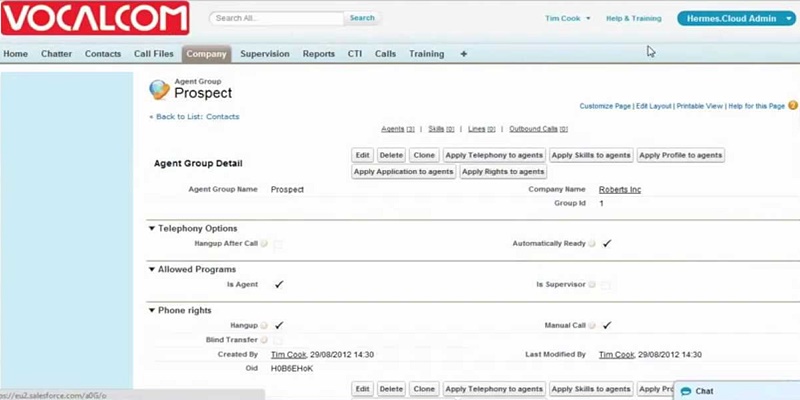
Vocalcom’s agent group lets you bundle
together customer types.
Cost of Call Center Software
Except for on-premise systems which will definitely require
considerable capital outlay, hosted and cloud solutions offered as
SaaS have become popular options because of their affordability and
flexibility. SaaS models are usually made available by vendors in
three or four pricing plans through monthly/annual subscription fee
or payment, and depending on the features tucked in. Some plans
even go for free. Here are examples of the cost of call center
software, how vendors stack up on pricing with their basic plans on
one end and their most advanced offerings at the other end.
- Freshdesk: Sprout – free; Forest – $89/agent
per month - Sharpen: Voice Only – $20/user per month;
Customer Care+Sales Accelerator – $130/user per month - Nectar Desk: Has free plan; Basic – $29/agent
per month; $99/agent per month - CrazyCall: Has free plan; Basic – $30/user per
month; Plus – $119/user per month - PhoneWagon: Starter – $39/ month; Enterprise –
$249/month
Examples of Call Center Software
To give you an idea of this market niche and how they differ
from each other, here are top examples of call center software.
- Freshdesk[11] is an
award-winning cloud-hosted help desk solution designed to
meet demands of both small businesses and large companies. Its
most significant features include multichannel capability;
integrated game mechanics to increase agent productivity; multiple
SLA policies; smart automations; and self-service portals. The
solution comes with standard features such as help desk ticketing,
knowledge base, and community platform. It can transform your
support emails into tickets which you can track for rapid and
accurate response. - Five9[12] is a mix of
inbound and outbound capabilities that combine to create Active
Blending. You can use the platform to maximize your agents’
productive time and respond proactively to your customers. The
blending capability allows you, for instance, to adjust your
contact center traffic and always prioritize inbound customer
service calls. The dynamic and predictive dialer technology
automatically moves outbound agents to inbound queues and, when
there are no inbound calls in queue, shifts to outbound call
processing. - Vocalcom Cloud Contact Center[13] is a
cloud-based, scalable platform that lets you easily add agents,
customize reports, and design IVRs. It supports voice, chat, email,
SMS, Twitter, and Facebook – all from one place. It goes beyond Web
chat and audio communication to include video and co-browsing, and
seamless transition from self-service to live service. It preserves
the context of previous interactions, and can quickly be deployed
as an always-on, secure contact center solution using a
pay-as-you-go model. - PlayVox[14] is monitoring
software for live chat, email and phone designed to help businesses
analyze how the customer support staff interacts with actual
customers. It aims to enhance performance and customer experience,
and can create a QA monitoring program in minutes. Customer
interactions can be analyzed in all channels for a robust
evaluation of coaching and motivation. At the same time, PlayVox
also helps businesses train their customer support staff for better
performance and improved customer experience. - Convoso[15] provides a
simple to use, yet powerful inbound and outbound call center
platform designed to supercharge your call center productivity.
Their all-in-one products are equipped with proprietary and
market-leading features and functionality that cater to call
centers of any size – from outbound call centers ranging from 1-10
seats to inbound, outbound, and blended call centers from 11-1000+
seats. The systems require no hardware or phones to make calls as
it uses a softphone that only needs an active internet
connection.
Is Call Center Software Right For You?
If you care enough to provide your customers with the best
customer support and would like to efficiently manage your
company’s inbound and outbound communications from multiple contact
channels, then you can’t go wrong with having call center software.
It significantly reduces the strain on your customer support team,
streamlines the process of who should take care of customer issues,
allows you two-way communication to engage with your customers
while building your relations with them, and gives you better
control and overview of what works or not with your support system.
There are just so many benefits that call center software can
provide you that it becomes a truly vital addition to your customer
support tools. You know this and we’ve said it again and again that
customer is king and needs royal treatment and support, because the
resulting returns can be huge for your business. Fortunately, you
have a solution in call center software fit for royalty, without
you having to come up with a king-sized budget.
Category: B2B News[16]
Tags: Call Center Software[17]
References
- ^
call center software
(customer-support.financesonline.com) - ^
shifting from web to phone (inbound
call) for support (hbr.org) - ^
customers prefer the following support
channels (econsultancy.com) - ^
Types of Call Center
Software (financesonline.com) - ^
What Does Call
Center Software Do? (financesonline.com) - ^
How Does Call Center
Software Work? (financesonline.com) - ^
Advantages of Call Center Software
(financesonline.com) - ^
Features of Call
Center Software (financesonline.com) - ^
Cost of Call Center
Software (financesonline.com) - ^
Examples of Call Center Software
(financesonline.com) - ^
Freshdesk
(reviews.financesonline.com) - ^
Five9
(reviews.financesonline.com) - ^
Vocalcom Cloud Contact Center
(reviews.financesonline.com) - ^
PlayVox
(reviews.financesonline.com) - ^
Convoso
(reviews.financesonline.com) - ^
B2B News
(financesonline.com) - ^
Call Center Software
(financesonline.com)
Modern businesses are faced with numerous sources and types of
communication which they can utilize to their advantage. A set of
technology they can use to harness today’s multiple communication
channels is call center
software[1]. What is call center
software? It is a system that allows businesses to manage multiple
communication channels such as phone, email, live chat, instant
messaging, SMS text, and social media.
Call center software comes in many forms and functions including
auto dialer, call center monitors, call accounting solutions, call
analytics, predictive dialer, computer telephony integration (CTI),
interactive voice response (IVR), and automatic call distributor
(ACD). It can be utilized as part of a customer support platform or
help desk system with ticketing functionality to help agents
respond to customer queries and resolve issues.
Advancements in Voice over Internet Protocol (VoIP) and hosted
software has made a reality the hosted call center environment
requiring the most basic components – a PC, a browser and a phone.
With a call center solution, you can now easily set up your own
dedicated call center hub that can undertake quality monitoring,
call recording, speech/text analytics, virtual queuing/web
callback, and social media support. What is call center software?
It is your tool for enhancing your help desk and boosting customer
support which are service areas you should do well to focus on for
the reasons we’ll tackle next.
Despite its seemingly diminishing status and the wide
availability of self-service channels, the phone is still a favored
tool by customers. A research study by Harvard Business Review
found out that 57% of customers end up shifting
from web to phone (inbound call) for support[2]. Meanwhile, according to
eConsultancy, customers prefer the following support channels[3] when they need help:
phone, email, live chat, online knowledge base, and “click to call”
support automation. On the side of businesses, a Contact Center
Survey revealed that 62% of organizations view customer experience
provided through contact centers as a competitive
differentiator.
Top 5 Support Channels Preferred by
Customers
Credits: econsultancy.com
In this article, we’ll examine the many aspects of call center
software, including the following:
- Types of Call Center
Software[4] - What Does Call Center
Software Do?[5] - How Does Call Center
Software Work?[6] - Advantages of Call Center
Software[7] - Features of Call Center
Software[8] - Cost of Call Center
Software[9] - Examples of Call Center
Software[10]
Types of Call Center Software
The purpose of call center software is to help businesses manage
customer communication coming from multiple channels and sources.
Depending on how communications are processed and how the system is
deployed, call center software can be classified into the
following:
- On-premise call center systems. These are
usually sold with on-time utilization license where the company
user takes care of the upgrade and maintenance of the call center.
These normally require installation of private branch hardware and
equipment and are the most professional type of call centers,
although they are also the most expensive. - Cloud-based call center systems. These
are also SaaS models with the call center hosted in cloud,
accessible from anywhere without need for downloading or installing
the software. These are the most affordable call center
systems.
What Does Call Center Software
Do?
To answer the question – what does call center software do? – we
have to comprehend it basic purpose and function. The platform
basically allows a company or organization to run a call center
with the goal of extending support to customers for their
inquiries, and to serve as a help desk for customer issues. It
clears the way for customer communication with your company,
allowing them the means to interact and engage with your company
relating matters involving your business, products, and services.
Now communication through the call center system is two-way –
customer to you, and you to your customer (marketing, promotions,
feedback, deals, offers, etc).
To do all the above and more, call center software is built with
functionalities to facilitate that two-way communication. You can
utilize features for voicemails, emails, support ticket, chat, and
conferencing, among others. To get comprehensive information about
callers, call center systems provide integration capabilities with
CRMs, helpdesks, ecommerce platforms, marketing software, and chat
systems. Integrated call center software can show you the caller’s
previous purchase history, voicemails, notes, cases, phone calls
with the company, chat transcripts, support tickets, and others.
All the functionalities allow agents to deliver better service,
streamline workflows, and get rid of entering redundant information
into multiple systems.
Freshdesk’s ticket dashboard shows your
key metrics at a glance.
How Does Call Center Software
Work?
The workings of call center software will determine the level of
quality of the support service and help you’ll provide to your
customers. How does call center software work? Call center software
is first and foremost a management solution used by organizations
to administer the incoming calls and communication related to
product support or informational queries. Likewise, it is also used
to make outbound calls to targeted audience for product marketing
and sales. Call center software typically facilitates the following
steps:
- The system identifies the customer by checking the unique entry
in the database (DB), and if the caller is not in the DB
then the software usually adds the new caller’s entry for future
reference. - If the caller’s entry is in the DB, the records are accessed
and showed to the agent when they get a call, equipping the agent
with enough information about the customer including issue history
before handling the call. - When the caller has provided a reply to the automated response
or by verbal acknowledgment, the call is properly queued according
to the mapping in the DB (usually based on agent skills
set and the queue name). - As the call is pushed to the queue, all agents that are mapped
to that queue can pick up the call manually or take it as an
automatic assignment based on a scheduling system. - Upon taking the call, the agent can assist the customer by
giving instructions over the call or through email, having
supervisors/senior agents in on the call for guidance and faster
resolution, or even by taking remote access to the caller’s
system. - If the issue is not resolved at that time, the system allows
the agent to keep of the interactions with the customer, and can do
regular follow-up to keep track on the status and progress. - Based on the customer’s response, an agent can indicate the
status of the ticket as open, closed, resolved, or requires
follow-up. - When the status of the ticket is marked as “closed”, an
automated survey call or email is sent to the customer for
feedback, the results of which can be utilized by the company for
its marketing strategies or other purposes.
As you can see from the steps above, system streamlines an
otherwise tedious process and makes the job of call center agents
easier and less complicated, ensuring efficiency and productivity
to assigned personel, and providing quality and prompt support to
customers.
Five9: Mixes inbound and outbound
capabilities to boost agents’ productivity.
Advantages of Call Center
Software
Why use call center software? What is call center software but a
system designed for efficiency and productivity, maximizing the use
of communication technology to engage and interact with your
customers especially in addressing their issues. The overall goal
is to enable you business to provide the best customer support, on
time help, and optimal customer experience. Here are the following
advantages of call center software:
- Lower costs. On premise call center
solutions will require you to come up with fully capable
components, hardware, and application which, of course, translate
to an investment that may take a longer time to recoup. However,
the more popular and budget friendly SaaS and hosted solutions can
provide you a call center system without the worry of installation,
hardware, upgrades, and maintenance while keeping the system
secured and up all the time. The definitely equates to lower
cost. - Small remote teams. Unless you run a
large BPO operation, having small dedicated teams would suffice for
most of your customer support requirements. Adding to your cost
savings is having remote agents for your virtual call centers. They
can be at any geographical location and as long as they have
internet connected devices, they form part of your team. - Enhanced security. Call center software,
especially cloud or hosted platforms, carry security features to
keep your call center operation safe and running all the time. It
is therefore vital that you get a reliable provider that has robust
security protocols, compliance, and maintenance of the system. - Operational flexibility. Today’s call
center software is out-of-the-box, all-in-one solution, being able
to do so much more than managing calls and information. They are
easy to use even by new agents and are designed to adapt to
multiple types of operations simultaneously. The software can be
integrated with your existing apps for CRM, CEM, e-commerce,
marketing solutions, and others, giving you a powerful platform. It
is also highly configurable to meet all sorts of organizational
needs. - Productivity booster. Call center
software is packed with intuitive and automated features such as
auto-dialers, monitoring tools, time routing, prioritization, and
call route matrices. Each system works on KPIs to measure the
productivity of each agent, and to reveal real-time feedback on how
you customer support is actually doing. - Improved customer
relationships. Improving customer relations starts
with delivering the best customer support. One survey found that
80% of companies say they deliver “superior” customer service but
only 8% of customers think so. Call center software gives you the
means to provide optimal, reliable and prompt customer service.
Customer is king, and if they feel their issues are taken for
granted, they can easily churn which you wouldn’t want for your
business.
Features of Call Center
Software
We can only fully understand what is call center software by
learning about its features. Here are some of the key functions and
features of call center software:
- Controlled Telephony. Call center
software is just like your typical phone but reengineered for call
control with a mouse click enabling you to hold, transfer, or mute
callers. Of course the system can do more than just voice calls; it
can do live chat, conferencing, email, and even respond to social
media messages. - Automatic Call Distributors. ACD comprises the
heart of every good call center. It enables route calls to the most
appropriate agent without you being involved in the process, while
monitoring performance and gathering information. - Interactive Voice Responses. IVR is the
‘meanwhile feature’ that takes care of callers before/after they
are connected to the appropriate agents. These could be message
greetings, service prompts menu, or waiting queue coverage. - Call Queues. These are used by virtual
call centers so that customers don’t ‘disappear’ after being told
that they have to wait. Each department/agent gets specifically
designed waiting queue where customers arrive after being skills
routed; and a special dashboard is used to measure statistics based
on real-time data. - Disposition Codes. This feature tags the
outcome of every call such as ‘Not interested’, ‘Transferred to IT
support’, ‘Refunded’, and so on. Agents select the code from a
special menu, and attach it in the profile of a particular
caller. - Call Barging. Developed for new agents,
this gets to transfer the call to the manager (without informing
the client about it) who can drop in on the agent’s behalf using a
feature called whisper coaching. - Predictive and Power Dialers. Used
primarily to inform a client when an agent becomes available, and
can even make calls automatically and connect the agent to a group
of callers. - Voicemail and Notifications. These allow
customers to leave a message for the agent when he is not
available. Advanced systems are capable of transcribing messages,
or email them to the agent to keep messages within the activity
feed. - Real-Time and Historical Reporting. The
reporting feature is view and learn about metrics including number
of calls per day/line/agent/department, average duration, average
abandoning rate, waiting time, service level, and more. - Integration. This significantly extends the
functionality of the system, allowing it to work with third-party
apps to secure more client/caller information, process and analyze
customer data, build up customer relations, and do other tasks
right within a single platform.
Vocalcom’s agent group lets you bundle
together customer types.
Cost of Call Center Software
Except for on-premise systems which will definitely require
considerable capital outlay, hosted and cloud solutions offered as
SaaS have become popular options because of their affordability and
flexibility. SaaS models are usually made available by vendors in
three or four pricing plans through monthly/annual subscription fee
or payment, and depending on the features tucked in. Some plans
even go for free. Here are examples of the cost of call center
software, how vendors stack up on pricing with their basic plans on
one end and their most advanced offerings at the other end.
- Freshdesk: Sprout – free; Forest – $89/agent
per month - Sharpen: Voice Only – $20/user per month;
Customer Care+Sales Accelerator – $130/user per month - Nectar Desk: Has free plan; Basic – $29/agent
per month; $99/agent per month - CrazyCall: Has free plan; Basic – $30/user per
month; Plus – $119/user per month - PhoneWagon: Starter – $39/ month; Enterprise –
$249/month
Examples of Call Center
Software
To give you an idea of this market niche and how they differ
from each other, here are top examples of call center software.
- Freshdesk[11] is an
award-winning cloud-hosted help desk solution designed to
meet demands of both small businesses and large companies. Its
most significant features include multichannel capability;
integrated game mechanics to increase agent productivity; multiple
SLA policies; smart automations; and self-service portals. The
solution comes with standard features such as help desk ticketing,
knowledge base, and community platform. It can transform your
support emails into tickets which you can track for rapid and
accurate response. - Five9[12] is a mix of
inbound and outbound capabilities that combine to create Active
Blending. You can use the platform to maximize your agents’
productive time and respond proactively to your customers. The
blending capability allows you, for instance, to adjust your
contact center traffic and always prioritize inbound customer
service calls. The dynamic and predictive dialer technology
automatically moves outbound agents to inbound queues and, when
there are no inbound calls in queue, shifts to outbound call
processing. - Vocalcom Cloud Contact Center[13] is a
cloud-based, scalable platform that lets you easily add agents,
customize reports, and design IVRs. It supports voice, chat, email,
SMS, Twitter, and Facebook – all from one place. It goes beyond Web
chat and audio communication to include video and co-browsing, and
seamless transition from self-service to live service. It preserves
the context of previous interactions, and can quickly be deployed
as an always-on, secure contact center solution using a
pay-as-you-go model. - PlayVox[14] is monitoring
software for live chat, email and phone designed to help businesses
analyze how the customer support staff interacts with actual
customers. It aims to enhance performance and customer experience,
and can create a QA monitoring program in minutes. Customer
interactions can be analyzed in all channels for a robust
evaluation of coaching and motivation. At the same time, PlayVox
also helps businesses train their customer support staff for better
performance and improved customer experience. - Convoso[15] provides a
simple to use, yet powerful inbound and outbound call center
platform designed to supercharge your call center productivity.
Their all-in-one products are equipped with proprietary and
market-leading features and functionality that cater to call
centers of any size – from outbound call centers ranging from 1-10
seats to inbound, outbound, and blended call centers from 11-1000+
seats. The systems require no hardware or phones to make calls as
it uses a softphone that only needs an active internet
connection.
Is Call Center Software Right For You?
If you care enough to provide your customers with the best
customer support and would like to efficiently manage your
company’s inbound and outbound communications from multiple contact
channels, then you can’t go wrong with having call center software.
It significantly reduces the strain on your customer support team,
streamlines the process of who should take care of customer issues,
allows you two-way communication to engage with your customers
while building your relations with them, and gives you better
control and overview of what works or not with your support system.
There are just so many benefits that call center software can
provide you that it becomes a truly vital addition to your customer
support tools. You know this and we’ve said it again and again that
customer is king and needs royal treatment and support, because the
resulting returns can be huge for your business. Fortunately, you
have a solution in call center software fit for royalty, without
you having to come up with a king-sized budget.
Category: B2B News[16]
Tags: Call Center Software[17]
References
- ^
call center software
(customer-support.financesonline.com) - ^
shifting from web to phone (inbound call) for
support (hbr.org) - ^
customers prefer the following support channels
(econsultancy.com) - ^
Types of Call Center
Software (financesonline.com) - ^
What Does Call Center
Software Do? (financesonline.com) - ^
How Does Call Center
Software Work? (financesonline.com) - ^
Advantages of Call Center Software
(financesonline.com) - ^
Features of Call
Center Software (financesonline.com) - ^
Cost of Call Center
Software (financesonline.com) - ^
Examples of Call Center Software
(financesonline.com) - ^
Freshdesk
(reviews.financesonline.com) - ^
Five9
(reviews.financesonline.com) - ^
Vocalcom Cloud Contact Center
(reviews.financesonline.com) - ^
PlayVox
(reviews.financesonline.com) - ^
Convoso
(reviews.financesonline.com) - ^
B2B News
(financesonline.com) - ^
Call Center
Software (financesonline.com)
Read more https://financesonline.com/call-center-software-analysis-features-benefits-pricing/